Blend
Mix A/B volumes with a shared 0 dB endpoint. Equal power starts both at −3.01 dB in the center.
Headings keep the original Spectrascope (Archive) font. Your text font and palette follow you across this site. Ghost circuit effects can be switched off; reduced-motion settings are respected.
SPECTRA DEVICES / GPL v3
Two small tools for turning a Live Set into something you can play.
Blend two tracks with one gesture. Gather separated stems into a shared clip palette. Open the patches, change the code and make them yours.
001 / PERFORM THE MIX
Turn a transition into a gesture—and let Live remember it.
Fade a new loop in while carving space in the old one. Trade foreground and background between two stems. Record the movement once, then edit and replay its X, Y and Z envelopes in Live’s normal automation lanes.

Mix A/B volumes with a shared 0 dB endpoint. Equal power starts both at −3.01 dB in the center.
Trade lows and highs in opposing directions, using one EQ Three directly on each target track.
Balance the mids separately. Use the depth handle, Alt/Option-drag, or the native Z control.
Independent curves and shape controls for every axis. Linear EQ by default, plus gentle sweeps, a center hold, a faster center response and custom graphs you can draw.
One front bank: shape/axis encoder pairs, curve buttons at 2, 3 and 5, plus the volume curve on encoder 7. Compact highlighted letter choices keep Push’s expanded lists short; Live keeps full names.
Native automation, immediate gain updates and display redraws capped at 20 fps. Volume-only tracks work too. Add EQ Three when you want Y/Z control.
Keep the .amxd beside its two bundled JS scripts. Load it on a dedicated MIDI track.
Choose A/B. Add one EQ Three directly on each for EQ control. The volume endpoints are 0 dB; existing EQ baselines are retained.
Enable Automation Arm and Arrangement Record. Move the Cube or Push encoders 2/4/6.
Stop recording and play the section. Use Re-Enable Automation after manual overrides; keep the Cube active.
This is the current automation edition. The older internal REC/LOOP device remains in historical releases; its recorded envelopes are not migrated automatically.
002 / ORGANIZE THE MATERIAL
Many separated groups. Four common lanes. More combinations.
Stem separation gives you the parts; the collector makes them easier to play. Gather drums, bass, vocals and other clips from several source groups into one shared Session palette. Try one source’s drums under another’s bass or build a new set from your favorite pieces.
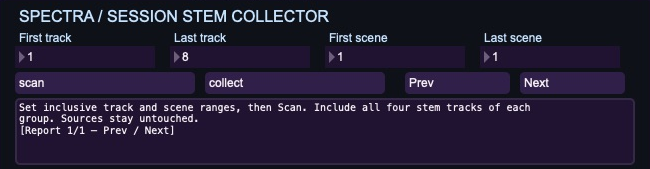
Select an inclusive track/scene rectangle and Scan. Review matching four-stem groups in the paged report, then Collect.
Each source row becomes one destination row. Missing clips leave empty cells. Rows follow scene order, then group order.
Each run creates four new muted tracks. Copies leave originals untouched and refuse occupied slots. Unmute and audition when ready.
Use Live’s stem separation first, with all four stems and no merging. Save a copy of the Set.
Load the .amxd beside controller.js. Choose track/scene bounds and inspect the report.
Copy matching clips into fresh Collected Drums / Bass / Vocals / Other tracks.
Stop original clips before unmuting copies. Track effects, mixer settings and track automation are not copied.
Session View only. Group matching uses stem names; inspect the preview. This device organizes already separated clips and does not perform audio separation.
LOCAL TOOLS / OPEN SOURCE
Both devices are GPL-3.0-only. Source, editable Max patches, build scripts and tests are included. Each download also contains the license and its build inputs.